Your AI agents
are working.
Stop checking
on them.
A physical inbox for your AI agents. One small place on your desk to see what’s running, what’s done, and what needs you.
Pre-order / reserve for $129No charge now. $129 proposed, one time. Shipping timing isn’t set.
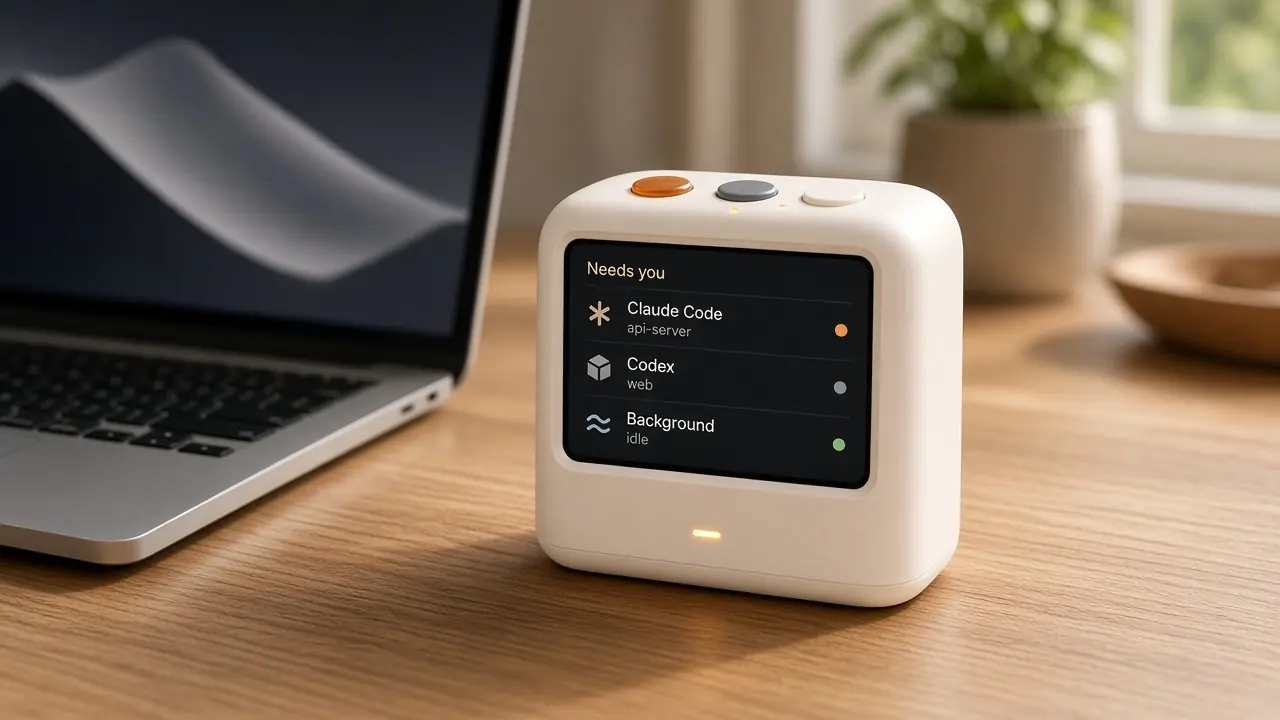
- 3.5 in screen
- Three buttons
- Status light
- Wi-Fi
- USB-C powered
- Free Mac app
Three buttons.
That’s the whole interface.
Press Inbox to cycle who needs you. Press Focus to open that terminal on your Mac. Hold to talk, and your reply is typed into the session.
-
Inbox
Press to cycle through the agents waiting on you. One at a time, until the queue is clear.
-
Push to talk
Hold the button and speak. Your voice reply is typed into that session.
-
Focus
Press to jump to that terminal on your Mac. The session on the device is the window that comes forward.

The agents you already run.
The Mac app reads sessions on your machine. The device shows the same picture.
- Claude Code
- Codex
- Cursor
- OpenCode
- Grok Bot
A menu bar that works
on its own.
The Mac companion is free with the device. It also stands alone: who’s working, who’s done, and who needs you, without anything new on the desk.
- Sessions for Claude Code, Codex, Cursor, OpenCode, and Grok Bot.
- A quiet split between working, done, and needs you.
- Focus a terminal, or dictate a reply into the session.
- Everything stays on your local network.
- Portfolio refresh Claude Code Working
- Checkout tests Codex Needs you
- API cleanup Cursor Done
A light you can read
from across the desk.
You shouldn’t have to open a terminal to know whether anyone is waiting. The lamp is the summary. The screen has the names.
-
Blue pulse
An agent is working. You can stay with what you’re doing.
-
Amber
An agent needs you. Press Inbox to see who.

What you get.
Wi-Fi, USB-C power, and a free Mac app. Final specifications aren’t set yet.
- Screen
- 3.5 inches
- Buttons
- Inbox, push-to-talk, and Focus
- Light
- Blue pulse while working. Amber when an agent needs you.
- Power
- USB-C
- Network
- Wi-Fi, on your local network
- Companion
- Mac menu-bar app, included
- Agents
- Claude Code, Codex, Cursor, OpenCode, and Grok Bot
- Price
- $129 proposed, one time
Before you reserve.
Shipping, payment, and where your sessions stay.
Will I be charged?
No. Pre-order reserves your interest at the proposed $129 price. There is no payment on this page, and nothing is charged now.
When does it ship?
Shipping timing isn’t set. A reservation saves your interest in this browser. It doesn’t place a paid order or promise a delivery window.
Where does my work go?
Everything stays on your local network. Agent Inbox talks to the coding agents already running on your Mac. Your prompts, code, and voice replies are not uploaded to us.
Does the Mac app need the device?
No. The menu-bar companion comes free with the device, and it also works on its own.
What does it need?
Wi-Fi and USB-C power, plus a Mac running the companion app. It shows Claude Code, Codex, Cursor, OpenCode, and Grok Bot.
Your agents have
a new home.
Reserve the device and the Mac app comes with it. Or tell us you want the app on its own.
In development. No payment today.
Timing and final specifications aren’t set yet.